เหมาะสำหรับ
- เริ่มจากพรอมต์ที่มีโครงสร้างและใช้ซ้ำได้ แทนที่จะเป็นแชทเปล่า
- ปรับพรอมต์ให้เข้ากับข้อมูลของคุณ โดยยังคงเจตนาเดิมไว้
- เวิร์กโฟลว์ที่เกี่ยวข้องกับ Design & Art, Business & Pro, Photography

สร้างภาพหัวโปรไฟล์มืออาชีพที่สมจริงสำหรับ LinkedIn หรือโปรไฟล์องค์กร
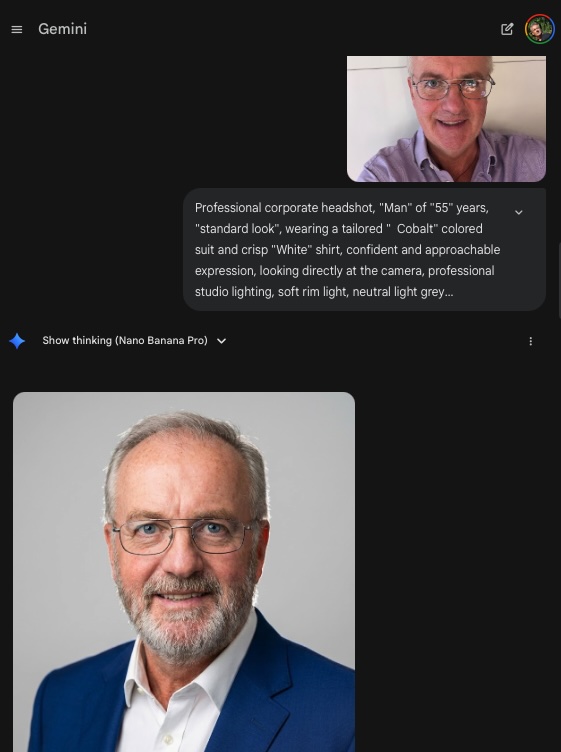


Create an image from the attached photo / person: Professional corporate headshot, {{Gender:Woman, Man, Girl, Boy, Non-binary}} of {{Age:5-85}} years, {{Apparent Age:standard look, looks younger, looks older}}, wearing a tailored {{Color: [dressing_colors]}} colored {{suit_or_style: [dressing_elements]}} and {{Shirt or Blouse color: [dressing_colors]}} for shirt or blouse, confident and approachable expression, looking directly at the camera, professional studio lighting, soft rim light, neutral light grey background, 8k resolution, photorealistic, sharp focus on eyes, shot on Sony A7R IV 85mm lens. Special features of this person: {{Features:None, Clean shaven, Full beard, Glasses, Freckles}}.
Woman, Man, Girl, Boy, Non-binary
5-85
standard look, looks younger, looks older
[dressing_colors]
[dressing_elements]
[dressing_colors]
None, Clean shaven, Full beard, Glasses, Freckles
Create an image from the attached photo / person: Professional corporate headshot, Woman of 5-85 years, standard look, wearing a tailored [dressing_colors] colored [dressing_elements] and [dressing_colors] for shirt or blouse, confident and approachable expression, looking directly at the camera, professional studio lighting, soft rim light, neutral light grey background, 8k resolution, photorealistic, sharp focus on eyes, shot on Sony A7R IV 85mm lens. Special features of this person: None.
ตัวแปรจะอยู่ภายใน {{ และ }} และเป็นไปตามรูปแบบนี้:
ตัวเลือกสามารถอ้างอิงรายการตัวแปรที่กำหนดไว้ล่วงหน้าโดยใช้วงเล็บเหลี่ยม ตัวเลือกเหล่านี้จะแสดงเป็น[สีส้ม]และให้ค่าที่ใช้บ่อย เช่น สี โทน หรือภาษา
คุณยังสามารถระบุรายการตัวเลือกแบบอินไลน์ โดยคั่นด้วยเครื่องหมายจุลภาคได้
เคล็ดลับ: คุณไม่จำเป็นต้องใช้แอป PUCO เพื่อใช้พรอมต์เหล่านี้! เพียงคัดลอกเทมเพลตและแทนที่แต่ละส่วน {{…}} ด้วยข้อความของคุณเองโดยตรงใน ChatGPT, Claude, Gemini หรือผู้ช่วย AI อื่น ๆ