
เหมาะสำหรับ
- เริ่มจากพรอมต์ที่มีโครงสร้างและใช้ซ้ำได้ แทนที่จะเป็นแชทเปล่า
- ปรับพรอมต์ให้เข้ากับข้อมูลของคุณ โดยยังคงเจตนาเดิมไว้
- เวิร์กโฟลว์ที่เกี่ยวข้องกับ Education & Academic, Creative & Visuals, Design & Art
วิเคราะห์ URL ของวิดีโอ YouTube เพื่อดึงแนวคิดสำคัญ และสร้างสรุปเนื้อหาเป็นอินโฟกราฟิกแบบวาดมือ (sketchnote)
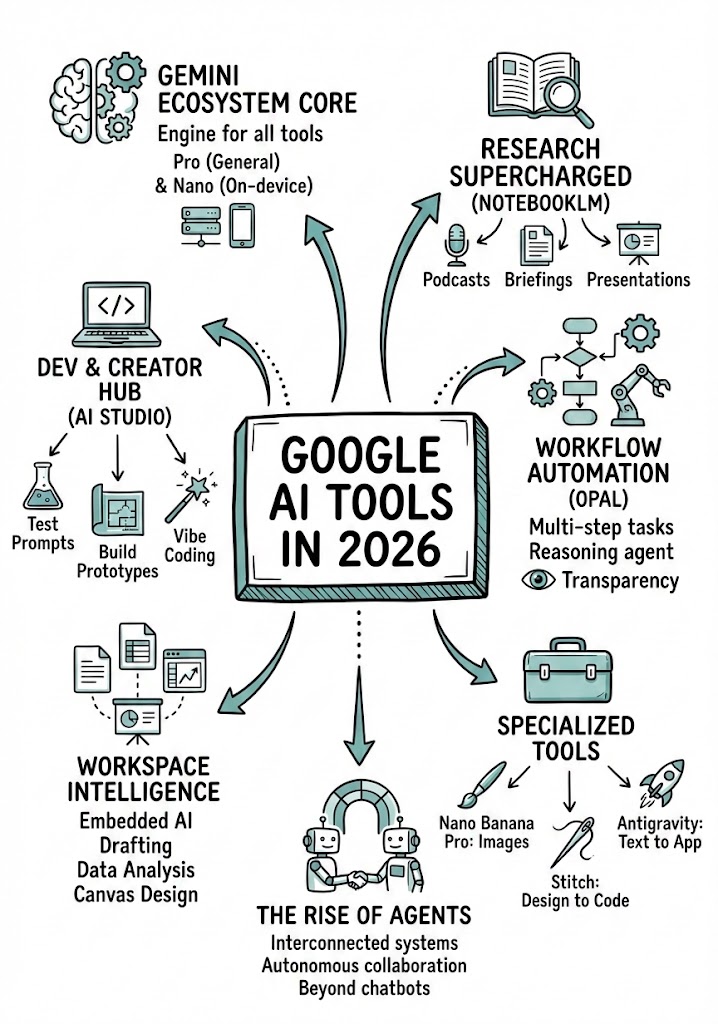
Analyze the YouTube video regarding {{Topic: Take from the video context}} located at: {{YouTube URL: https://youtu.be/...}}.

First, summarize the content into small, digestible concepts to learn easily.

Once analyzed, create a hand-drawn sketchnote visual summary of these notes using the following specifications:
- Background: Pristine white paper (no lines).
- Art Style: 'Graphic recording' or 'visual thinking' using black ink fine-liners for clear outlines and text.
- Colors: {{Accent Colors:Teal, Orange, Muted Red, Emerald Green, Navy Blue, Mustard Yellow, Charcoal Grey, Royal Purple}} for simple shading and accents.
- Composition: Center the main title in a 3D-style rectangular box. Surround the title with radially distributed simple doodles, business icons, stick figures, and graphs that explain the concepts. Use arrows to connect ideas.
- Text: Distinct, handwritten, all-caps printing, legible and organized like a professional brainstorming session.
- Orientation: A4 Vertical layout.
Take from the video context
https://youtu.be/...
Teal, Orange, Muted Red, Emerald Green, Navy Blue, Mustard Yellow, Charcoal Grey, Royal Purple
Analyze the YouTube video regarding Take from the video context located at: https://youtu.be/....

First, summarize the content into small, digestible concepts to learn easily.

Once analyzed, create a hand-drawn sketchnote visual summary of these notes using the following specifications:
- Background: Pristine white paper (no lines).
- Art Style: 'Graphic recording' or 'visual thinking' using black ink fine-liners for clear outlines and text.
- Colors: Teal for simple shading and accents.
- Composition: Center the main title in a 3D-style rectangular box. Surround the title with radially distributed simple doodles, business icons, stick figures, and graphs that explain the concepts. Use arrows to connect ideas.
- Text: Distinct, handwritten, all-caps printing, legible and organized like a professional brainstorming session.
- Orientation: A4 Vertical layout.
ตัวแปรจะอยู่ภายใน {{ และ }} และเป็นไปตามรูปแบบนี้:
ตัวเลือกสามารถอ้างอิงรายการตัวแปรที่กำหนดไว้ล่วงหน้าโดยใช้วงเล็บเหลี่ยม ตัวเลือกเหล่านี้จะแสดงเป็น[สีส้ม]และให้ค่าที่ใช้บ่อย เช่น สี โทน หรือภาษา
คุณยังสามารถระบุรายการตัวเลือกแบบอินไลน์ โดยคั่นด้วยเครื่องหมายจุลภาคได้
เคล็ดลับ: คุณไม่จำเป็นต้องใช้แอป PUCO เพื่อใช้พรอมต์เหล่านี้! เพียงคัดลอกเทมเพลตและแทนที่แต่ละส่วน {{…}} ด้วยข้อความของคุณเองโดยตรงใน ChatGPT, Claude, Gemini หรือผู้ช่วย AI อื่น ๆ