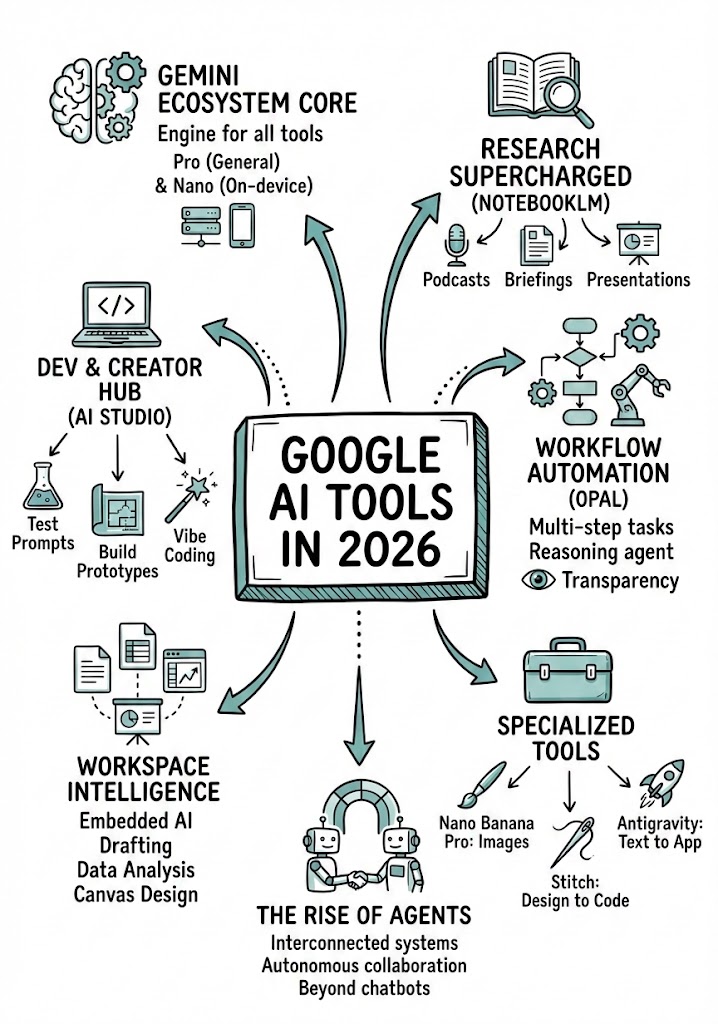
Analyze the YouTube video regarding {{Topic: Take from the video context}} located at: {{YouTube URL: https://youtu.be/...}}.

First, summarize the content into small, digestible concepts to learn easily.

Once analyzed, create a hand-drawn sketchnote visual summary of these notes using the following specifications:
- Background: Pristine white paper (no lines).
- Art Style: 'Graphic recording' or 'visual thinking' using black ink fine-liners for clear outlines and text.
- Colors: {{Accent Colors:Teal, Orange, Muted Red, Emerald Green, Navy Blue, Mustard Yellow, Charcoal Grey, Royal Purple}} for simple shading and accents.
- Composition: Center the main title in a 3D-style rectangular box. Surround the title with radially distributed simple doodles, business icons, stick figures, and graphs that explain the concepts. Use arrows to connect ideas.
- Text: Distinct, handwritten, all-caps printing, legible and organized like a professional brainstorming session.
- Orientation: A4 Vertical layout.
Guide du prompt
Idéal pour
Partir d'un prompt structuré et réutilisable plutôt que d'une conversation vierge.
Adapter le prompt à vos propres données tout en conservant l'intention d'origine.
Les workflows liés à Education & Academic, Creative & Visuals, Design & Art.
Comment l'utiliser
Copiez le modèle de prompt complet.
Remplacez chaque variable par votre propre contexte ou choisissez l'une des options suggérées.
Collez le prompt complété dans ChatGPT, Claude, Gemini ou un autre assistant IA.
Variables de ce prompt
Topic
Take from the video context
YouTube URL
https://youtu.be/...
Accent Colors
Teal, Orange, Muted Red, Emerald Green, Navy Blue, Mustard Yellow, Charcoal Grey, Royal Purple
Exemple de départ
Analyze the YouTube video regarding Take from the video context located at: https://youtu.be/....

First, summarize the content into small, digestible concepts to learn easily.

Once analyzed, create a hand-drawn sketchnote visual summary of these notes using the following specifications:
- Background: Pristine white paper (no lines).
- Art Style: 'Graphic recording' or 'visual thinking' using black ink fine-liners for clear outlines and text.
- Colors: Teal for simple shading and accents.
- Composition: Center the main title in a 3D-style rectangular box. Surround the title with radially distributed simple doodles, business icons, stick figures, and graphs that explain the concepts. Use arrows to connect ideas.
- Text: Distinct, handwritten, all-caps printing, legible and organized like a professional brainstorming session.
- Orientation: A4 Vertical layout.
Comment fonctionnent les variables
Syntaxe des variables
Les variables sont entourées de {{ et }} et suivent ce modèle :
{{variable name: option1, option2, option3}}
Variables prédéfinies
Une sélection peut référencer une liste de variables prédéfinie à l'aide de crochets. Elles apparaissent en [orange] et fournissent des valeurs courantes comme des couleurs, des tons ou des langues.
{{Tone: [tones]}}
Listes de choix personnalisées
Vous pouvez aussi fournir une liste de choix en ligne, séparés par des virgules.
Astuce : vous n'avez pas besoin de l'application PUCO pour utiliser ces prompts ! Copiez simplement le modèle et remplacez chaque section {{…}} par votre propre texte directement dans ChatGPT, Claude, Gemini ou tout autre assistant IA.
Utilisez ce prompt en quelques secondes, pas en minutes
Installez PUCO pour Mac : appuyez sur un raccourci dans n'importe quelle app, remplissez un formulaire intelligent, collez dans ChatGPT, Claude ou Gemini. Chaque variable devient un menu déroulant soigné. Vos dernières valeurs sont mémorisées.
Transforms an uploaded image into a highly detailed 3D plastic building Lego block diorama while preserving the original composition, subjects, and lighting.